

Free Resource
AWS Amplify Cost Calculator — PDF Cheat Sheet
All pricing, examples & comparisons in one printable PDF
Text-to-Speech
Deploying frontend apps shouldn't take hours. AWS Amplify gets your React, Vue, or Next.js app live in under 5 minutes with automatic CI/CD, global CDN, and zero server management. Here's everything you need to know.
What is AWS Amplify?
AWS Amplify is a complete deployment platform that connects your Git repository to AWS infrastructure. Push code → automatic build → global deployment. No Jenkins, no Docker configs, no server SSH.
The numbers: 1,000 free build minutes/month, 15 GB free bandwidth, 5 GB free storage. That's enough for 50+ deployments monthly at zero cost.
Why Amplify Beats Traditional Hosting
1. Git Push = Live Site (30 seconds)
Connect GitHub once. Every commit triggers automatic builds. Average deployment time: 2-3 minutes for React apps, 4-5 minutes for Next.js with SSR. Compare that to manual EC2 deployments taking 15-30 minutes.
2. Global CDN (220+ Edge Locations)
Your app loads from the nearest CloudFront edge location. Tokyo users get 50ms response times, not 500ms. SSL certificates auto-renew. Cache invalidation happens automatically on deploy.
3. Branch Deployments = Free Staging
Each Git branch gets its own URL. main → production, dev → staging, feature-x → preview. No separate servers needed. Test features before merging.
4. Cost Comparison
EC2 t3.micro: $8.50/month + $0.09/GB bandwidth = ~$15-20/month Amplify: $0 for small projects, $0.01/build minute + $0.15/GB for larger apps = ~$5-10/month Savings: 50-70% cheaper, zero maintenance time. Calculate your costs with our AWS Cost Calculator.
Killer Features
Instant Cache Invalidation: Updates go live immediately, no 5-minute CDN wait Atomic Deployments: Users never see broken pages during updates PR Previews: Every pull request gets a temporary URL for testing Password Protection: Lock staging environments with basic auth Environment Variables: Secure API key management per branch
Perfect For
- SPAs: React, Vue, Angular with client-side routing
- Static Sites: Gatsby, Hugo, Jekyll (build time: 1-2 minutes)
- Next.js/Nuxt: Full SSR support with automatic Lambda provisioning
- Portfolios: Deploy in 3 clicks, custom domain in 5 minutes
Deploy in 4 Steps
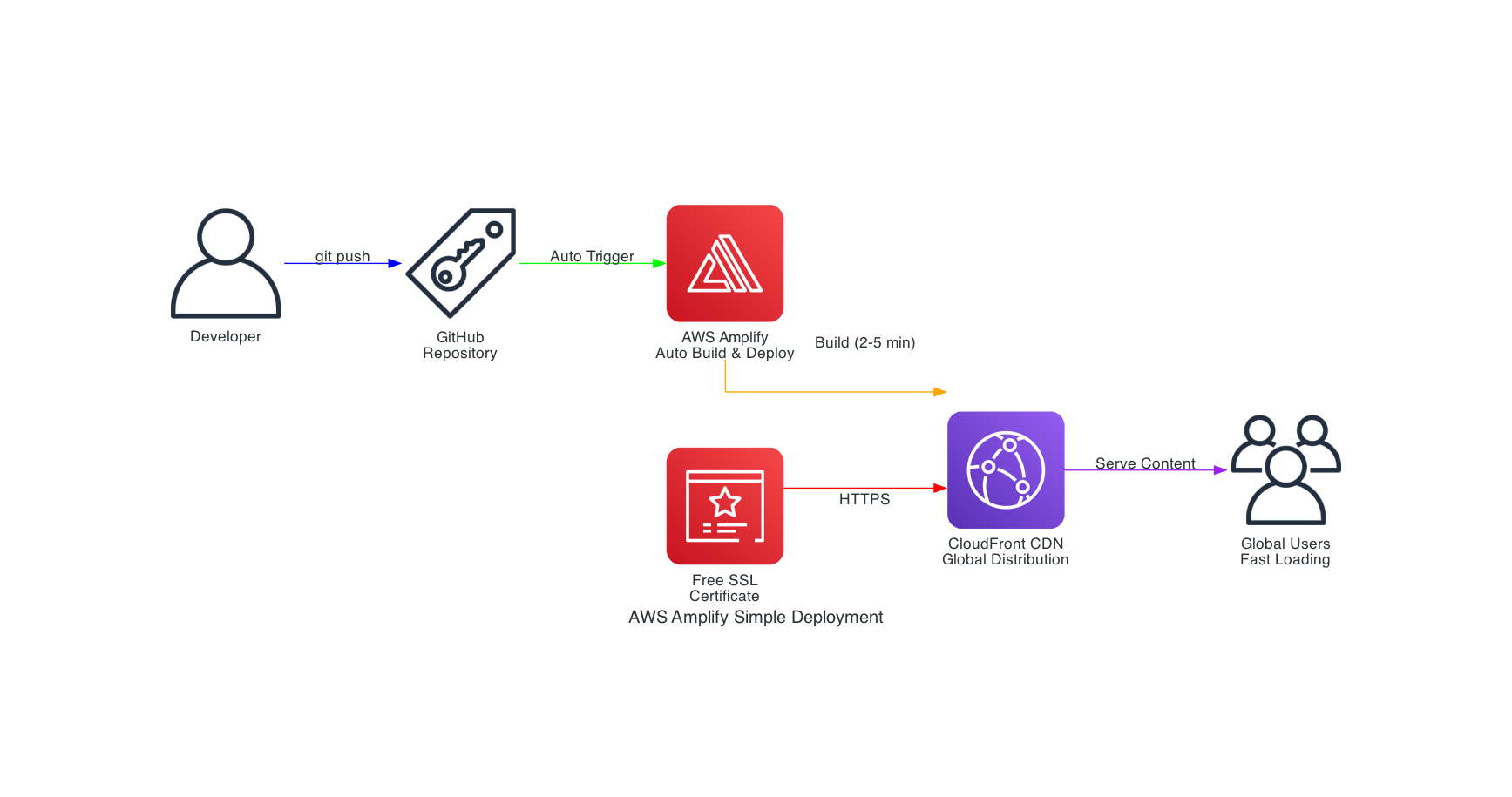
- Connect Git: Link GitHub/GitLab/Bitbucket (30 seconds)
- Auto-Detect: Amplify finds your framework and generates build settings
- Deploy: First build takes 3-5 minutes
- Done: Get
yourapp.amplifyapp.comURL instantly
AWS Amplify vs. Other Platforms
Amplify vs. Vercel
Vercel is excellent for Next.js applications and offers a superior developer experience for that specific framework. However, Amplify provides deeper AWS integration, making it ideal if you're already using AWS services like DynamoDB, Lambda, or Cognito. Amplify also offers more control over infrastructure and typically lower costs at scale.
Amplify vs. Netlify
Netlify pioneered the JAMstack deployment model and has a fantastic developer experience. Amplify matches most of Netlify's features while providing seamless integration with the broader AWS ecosystem. If you need AWS-specific services or enterprise features, Amplify is the better choice.
Amplify vs. EC2/Traditional Hosting
Traditional EC2 hosting gives you complete control but requires significant DevOps expertise. You manage servers, security patches, load balancers, and scaling. Amplify abstracts all of this away, letting you focus on building features instead of managing infrastructure. For most frontend applications, Amplify is the smarter choice.
Advanced Features for Power Users
Monorepo Support
Amplify supports monorepo structures, allowing you to deploy multiple applications from a single repository. Configure different build paths for each app and manage them independently.
Pull Request Previews
Enable automatic preview deployments for pull requests. Each PR gets its own temporary URL, making code reviews and QA testing incredibly efficient.
Password Protection
Protect staging or development branches with basic authentication. This is perfect for showing work-in-progress features to clients without making them publicly accessible.
Custom Redirects and Rewrites
Configure complex routing rules, redirects, and rewrites through a simple configuration file. This is essential for SPAs with client-side routing or migrating from old URL structures.
Best Practices for AWS Amplify
- Use Environment Variables: Never hardcode API keys or secrets. Use Amplify's environment variable management for secure configuration.
- Optimize Build Times: Cache dependencies and use efficient build commands to reduce build minutes and deployment time.
- Implement Branch Strategies: Use separate branches for development, staging, and production to maintain clean deployment workflows.
- Monitor Performance: Regularly check CloudWatch metrics and Amplify analytics to identify performance bottlenecks.
- Set Up Notifications: Configure SNS notifications for build failures and deployment events to stay informed.
Common Pitfalls to Avoid
Incorrect Build Commands: Make sure your build command matches your local development setup. Test builds locally before pushing to Amplify.
Missing Environment Variables: If your app works locally but fails on Amplify, check that all required environment variables are configured in the Amplify console.
Ignoring Build Logs: When deployments fail, the build logs contain valuable debugging information. Always check them first.
Not Using Custom Domains: While amplifyapp.com URLs work fine, custom domains provide better branding and SEO benefits.
Real-World Performance and Reliability
AWS Amplify leverages the same infrastructure that powers Amazon.com, one of the world's largest e-commerce platforms. This means you get enterprise-grade reliability with 99.9% uptime SLA. The global CDN ensures sub-second load times for users worldwide, and automatic scaling handles traffic spikes without any configuration.
Many companies have migrated from traditional hosting to Amplify and seen dramatic improvements. Build times reduced from 15 minutes to 3 minutes, deployment frequency increased from weekly to multiple times per day, and infrastructure costs dropped by 40-60%.
The Future of Frontend Deployment
AWS continues to invest heavily in Amplify, regularly adding new features and framework support. Recent additions include improved Next.js 13 support, enhanced monitoring capabilities, and better integration with AWS AppSync for GraphQL APIs. The platform is evolving to support edge computing and serverless functions at the CDN level, promising even faster performance.
Conclusion: Is AWS Amplify Right for You?
If you're building modern frontend applications and want to focus on code rather than infrastructure, AWS Amplify is an excellent choice. It combines simplicity with power, offering a streamlined deployment experience backed by AWS's robust infrastructure.
Amplify is ideal for startups, individual developers, and teams who want rapid deployment without sacrificing scalability or reliability. It's particularly valuable if you're already using AWS services or plan to integrate backend functionality.
Ready to deploy your first application on AWS Amplify? Watch my step-by-step video tutorial where I walk through the entire process, from account setup to production deployment. I'll show you real-world examples, troubleshooting tips, and best practices that will save you hours of trial and error.
If you want to master AWS, DevOps, and modern deployment strategies, subscribe to my YouTube channel where I share practical tutorials and real-world projects.
Follow me on social media for daily tips and updates:
Happy Deploying! Let's build something amazing together.
Comments
No comments yet. Be the first to comment!