

Text-to-Speech
How I Used Hostinger Horizons + Supabase to Launch a Monetized Platform in Under an Hour

🧠 The Problem:
Whether you’re a coach, mentor, or subject-matter expert — turning your knowledge into income often means offering 1:1 consultations. But building a site that can handle bookings, payments, reminders, and dashboards?
That usually means developers, tools, and weeks of work.
I wanted to test how far I could go with AI + no-code tools — and the result was surprisingly powerful.
🤖 Meet Hostinger Horizons
Hostinger Horizons is an AI-powered platform that lets you create full websites and web apps simply by describing your idea in a prompt. No design skills or development experience needed.
It’s built on top of Hostinger’s infrastructure — with integrated hosting, email, domain management, and full-stack AI functionality.
💡 The Use Case: A Consultation Booking Platform
Goal: Let users book 30/45/60 min sessions, pay online, and receive a meeting link.
Here’s what I built using Horizons:
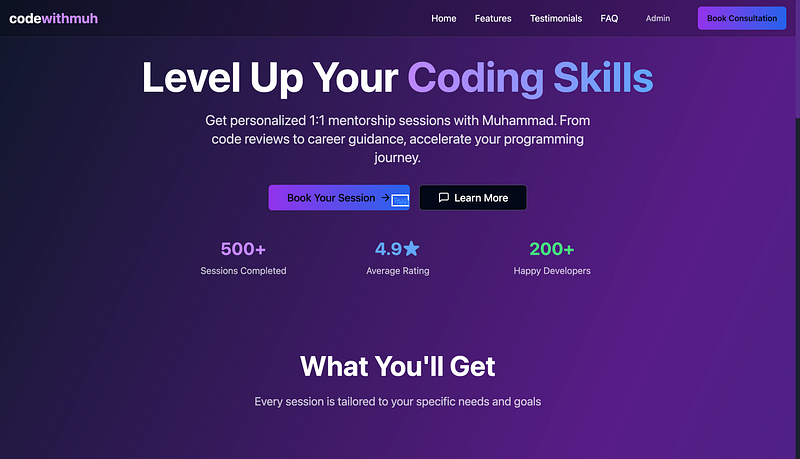
- 🏠 A modern homepage for my brand
- 💳 A booking form with session options
- 📧 Confirmation emails with Google Meet links
- 🔒 User & Admin login dashboards
- 📊 Data stored securely in Supabase
- 💸 Monetized using Stripe Checkout
Live Demo 👉 Visit Site
🛠️ How I Built It
- Used a Simple Prompt I asked Horizons to: “Create a consultation website with session options, booking form, testimonials, FAQs, and login pages.” It instantly generated the layout and content — editable with a visual builder.
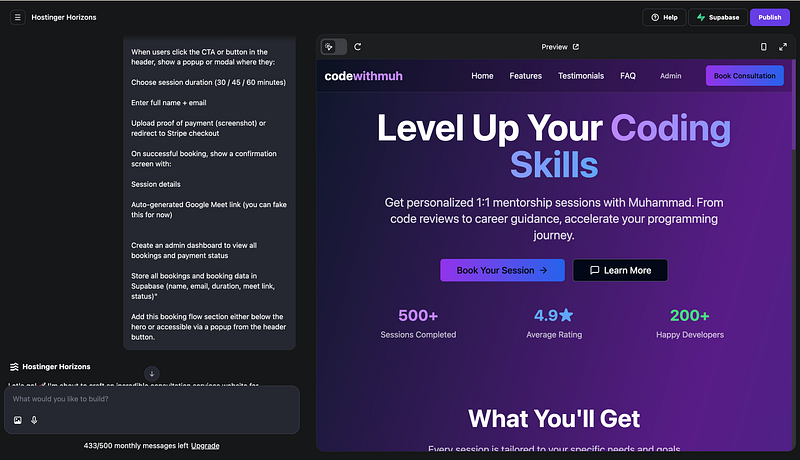
2. Integrated Supabase All booking data (email, time, session type) is saved in Supabase for easy access and analytics.
3. Handled Payments with Stripe I connected Stripe Checkout to collect payments. On success, the user gets a personalized confirmation email with meeting details.
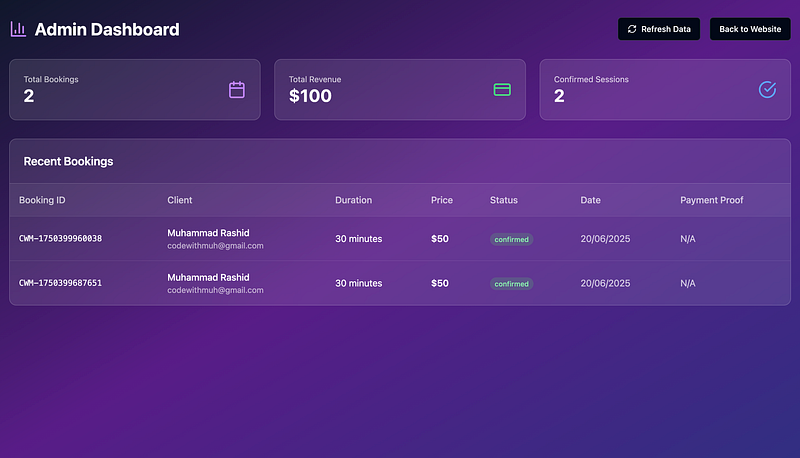
4. Set Up Dashboards
- Admins can manage and monitor bookings securely.
✅ Who This Is For
This setup works well for:
- Coaches / mentors
- Developers offering code reviews
- Designers doing audits or walkthroughs
- Creators monetizing their time with 1:1 calls
🧪 Pros and Cons of Hostinger Horizons
✅ Pros:
- Incredibly fast setup — minutes, not weeks
- Built-in hosting + email + domain
- Prompt-based interface that feels natural
- Supports exporting projects and adding integrations
- No coding required for 90% of the process
- Visual editor for full control after AI generates content
⚠️ Cons:
- Some integrations (like Stripe or Supabase) need a bit of manual effort
- Not ideal for highly custom backend logic (yet)
- Early-stage users may need guidance for payment flows
🔥 Final Thoughts
This was more than a basic landing page — I built a real, monetized platform with booking logic, secure dashboards, and email automation — all using Hostinger Horizons and Supabase.
I’m convinced this is a game-changer for indie creators, freelancers, and solopreneurs looking to launch something fast without compromising on features.
🎁 Want to Try It?
Launch your own site or app with AI today: 👉 hostinger.com/codewithmuh Use code CODEWITHMUH to get 10% off your first month or yearly plan.
A Complete Video tutorial Where You can learn How To create application, integrate Stripe, Supbase.
Let me know in the comments what you’d build with Horizons — or drop me a DM if you want help getting started.
Comments
No comments yet. Be the first to comment!