

Text-to-Speech
The AI in this system reads every ID card. It has never approved one.
Over the last few weeks I built a KYC (Know Your Customer) verification platform for a client in Pakistan. An applicant uploads their national identity card, a selfie, a utility bill and a bank statement. The system reads them, checks them, and hands a human reviewer a scorecard. Everything runs on open-source models inside the client's own AWS account. No document is sent to OpenAI or to any other third-party API.
This article walks through the build: the pipeline, the two models, the rules that sit around them, and the part where Urdu broke my prompts. If you are building onboarding for a fintech, a lender, a marketplace or an HR platform, or any product that reads documents, most of it transfers directly.
The One Rule: The Model Never Decides
Most AI KYC demos have the model look at an ID card and say "verified". That is the wrong design, and in a regulated business it is a dangerous one.
A vision model can read a card very well. It cannot tell you that NADRA actually issued it, that the person holding the phone is the person on the card, or that nobody edited the bank statement. And when it is unsure, it does not say so. It guesses, confidently.
So the work is split three ways:
- The model extracts and explains. It reads the fields and reports what it saw.
- Deterministic code checks. Check digits, dates, arithmetic and address matching, each rule carrying a version number.
- A human decides. The reviewer sees the evidence and makes the call.
Every check records the policy version it ran under, so a decision made today can still be defended after the rules change.
What the Applicant Does
- Chooses a country. This comes first because it decides what "national identity card" means: a CNIC in Pakistan, an NID in Bangladesh. Pakistan is the only market an applicant can finish in today. Bangladesh is listed as "not available yet" instead of being hidden.
- Types their home address. It is never pre-filled from a document, so every document is compared against what the applicant says, not against itself.
- Chooses an identity document: a CNIC (front and back) or a passport data page.
- Takes a selfie.
- Uploads proof of address and says what it is (a bill, a bank or wallet statement, a tenancy agreement), because that answer changes both the prompt and the rules.
- Uploads a source-of-wealth document.
- Confirms or corrects everything the system read.
The Architecture
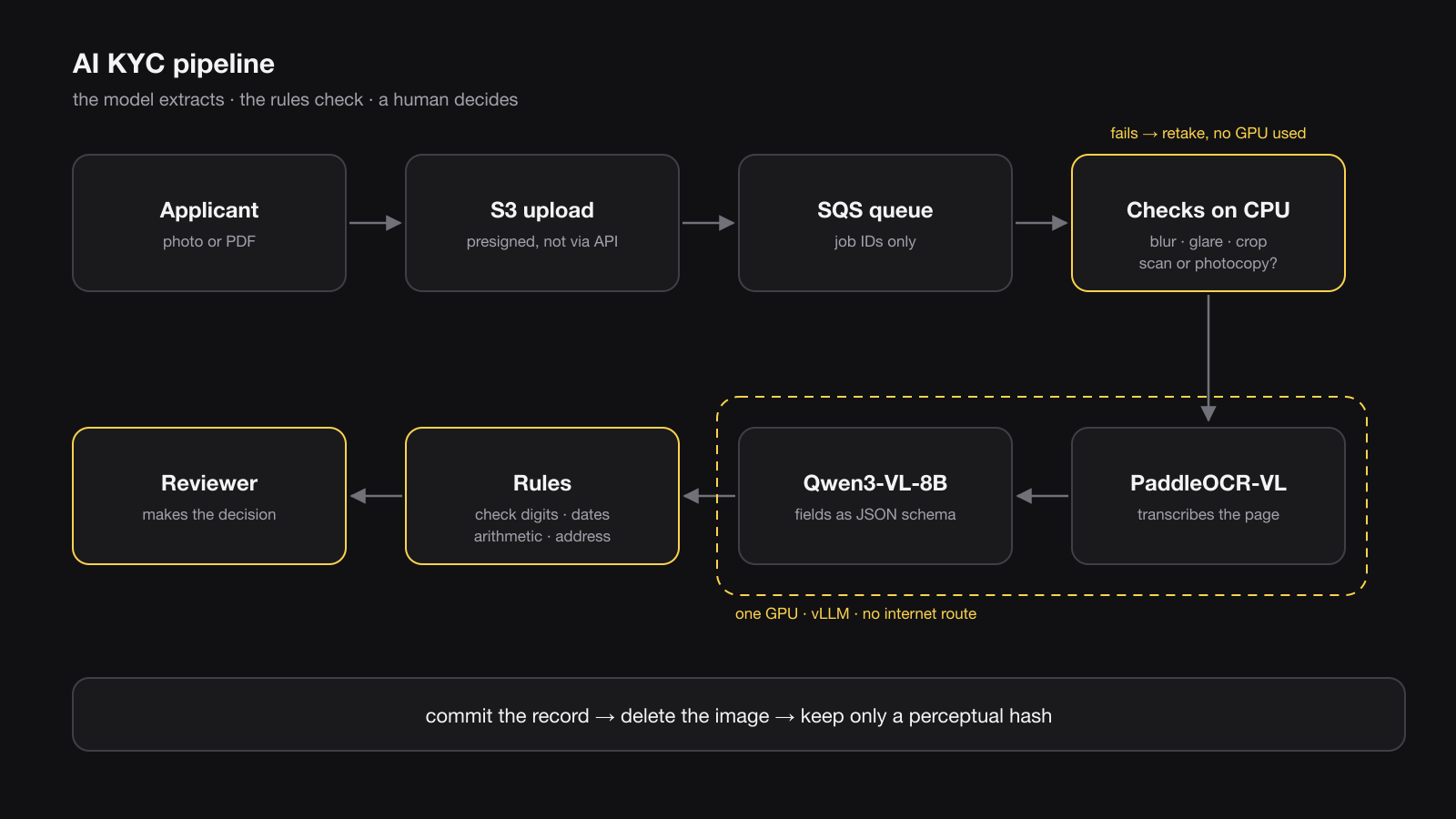
- Frontend: Next.js on AWS Amplify
- API: Django REST Framework on ECS Fargate
- Uploads: Presigned S3 URLs, straight from the browser
- Queue: Amazon SQS
- Worker: Python, OpenCV, the deterministic checks
- Models: PaddleOCR-VL (0.9B) and Qwen3-VL-8B-Instruct-FP8, served by vLLM
- GPU: One SageMaker
ml.g6e.xlarge(NVIDIA L40S, 48 GB), in a subnet with no internet route - Database: PostgreSQL on RDS
- Infrastructure: Terraform and GitHub Actions
One detail matters more than it looks: document images never pass through the API. The browser uploads straight to S3. Only the worker can read an image, and only inside the private network.
Step 1: Refuse Bad Images Before the Model Sees Them
The single most useful thing in the pipeline is not a model. It is a cheap OpenCV check that runs first. If you send a blurry CNIC to a vision LLM, you do not get an honest "I can't read this". You get a confident wrong answer, and that is worse than failing.
# worker/quality.py - runs BEFORE any model is called.
gray = cv2.cvtColor(image, cv2.COLOR_BGR2GRAY)

# Variance of the Laplacian: the standard blur measure.
blur = float(cv2.Laplacian(gray, cv2.CV_64F).var())
if blur < 100.0:
    flag(QualityIssue.TOO_BLURRY)

brightness = float(np.mean(gray))
if brightness < 60:
    flag(QualityIssue.TOO_DARK)

# Blown-out highlights: laminated cards reflect badly under direct
# light, and the glare lands exactly on the printed fields.
if float(np.mean(gray > 250)) > 0.04:
    flag(QualityIssue.GLARE)

# Blur, glare and darkness block extraction outright.
blocking = {QualityIssue.TOO_BLURRY, QualityIssue.GLARE, QualityIssue.TOO_DARK}
passed = not (blocking & set(issues)) and score >= 0.5
A failed check produces a specific instruction for the applicant, such as "There's glare on the card. Tilt it slightly and retake.", with no GPU time spent. The gate is tuned for the worst case: a low-end Android phone, poor light, glare on a laminated card, heavy JPEG compression.
A second check runs before the model too: is this the original document, or a copy of it? A scan or a photocopy is the easiest way to present an edited document, and a photocopy of a CNIC proves nobody is holding the card. Some cases can be decided from the file alone:
- A CNIC uploaded as a PDF. NADRA issues no CNIC PDFs, so a CNIC PDF is always a scan.
- A black-and-white CNIC. The card is printed in colour, so no colour means a copy.
- A bank or utility PDF with no text layer. A PDF made only of page images is a scan of a printout.
- Scanner software in the metadata. Scanner apps and office scanners name themselves in the file.
The rest, like a photo of a photocopy or a "Scanned with CamScanner" watermark, needs eyes, so the vision model reports it as evidence and the rules settle it.
Step 2: Two Models, Routed by Why They Failed
Two open-source models share one GPU. The router gives the small one about 25% of the GPU memory and the large one about 75%:
- PaddleOCR-VL (0.9B) transcribes the page.
- Qwen3-VL-8B (FP8) turns what was read into structured fields, using vLLM's structured output (
response_formatwith a JSON schema) so the answer always parses.
The obvious way to combine them is "if the OCR confidence is low, try the bigger model". That picks the wrong thing to route on. Low OCR confidence usually means a bad image, not a weak model, and a bigger model looking at a bad image just guesses more fluently. So the pipeline routes on the failure mode:
def choose_route(*, quality_passed, quality_score,
                 previous_route=None, previous_confidence=None,
                 schema_valid=True) -> Route:
    if not quality_passed:
        return Route.RETAKE_REQUIRED          # no model is called at all

    if previous_route is None:
        return Route.PRIMARY_OCR              # OCR transcribes, VLM structures

    if previous_route is Route.PRIMARY_OCR:
        if not schema_valid or (previous_confidence or 0.0) < 0.60:
            if quality_score < 0.75:
                return Route.DEGRADED_SCAN    # the pixels are the problem
            return Route.REASONING_VLM        # the fields are the problem

    if previous_route is Route.DEGRADED_SCAN and (previous_confidence or 0.0) < 0.60:
        return Route.REASONING_VLM

    return previous_route
One honest detail: the routing table originally sent degraded scans to a third model, olmOCR 2. That model was never deployed, and those requests quietly fell through to another one. Nothing errored, so nothing flagged it. Now each route names the model that actually runs.
Step 3: The Urdu Address That Broke Everything
The front of a CNIC prints English fields next to the Urdu ones, so the first design read only the English. That worked for the front. The back is different: on most cards, the permanent address is printed only in Urdu. Reading "English fields only" returned an empty address, and the app told applicants to retake a photo that was perfectly fine.
The first fix was one prompt asking Qwen3-VL to read the Urdu, find the permanent address, translate it and fill in the JSON schema. On a sharp photo of a real card, it returned every field empty. PaddleOCR-VL did worse: it produced one line of garbled Arabic, repeated until it ran out of tokens.
Then I asked Qwen3-VL to do only one thing: transcribe the card. It read the address nearly word for word.
So the back is now read in two passes, with code in between:
- The model transcribes the card as printed, and does nothing else.
- Code finds the permanent address in that transcription by its printed label, مستقل پتہ. This is not a judgement call: the card always prints the address after that label. The code also tolerates the label being misread by one dot, as in منتقل.
- The model writes the English version, and that is its only job in this pass.
READ_PROMPTS = {
    "CNIC_BACK": (
        "Transcribe the text printed on the back of this Pakistani CNIC, line "
        "by line, exactly as printed, in the script it is printed in. Do not "
        "translate. If a second image is provided, it is a close-up of the "
        "same card: read the small text from it."
    ),
}
# A dozen short lines. The cap bounds the cost of a reading that loops
# anyway, and the penalty makes a loop less likely.
READ_MAX_TOKENS = 768
READ_REPETITION_PENALTY = 1.05
I measured it on one real card, read six ways: as taken, rotated each way, smaller, darker and more heavily compressed. The bare prompt above scored 0.86 similarity to the true address on average, and 0.82 at worst. Every hint I added made it worse. Naming the two address labels dropped it to 0.30. Giving the model a list of words these addresses usually contain made it recite the list back, "House 123, Street 45, Block 6, Sector 7", as an address the card does not have.
The two words it misreads most, ڈاک خانہ (post office) and تحصیل (tehsil), are corrected in code, and only where they appear inside an address, where a correction cannot invent anything. Because the reading still is not perfect, the applicant confirms or corrects both the Urdu and the English on the details step, and the reviewer can see the address was read from Urdu.
The lesson I keep relearning: when a model fails at a multi-step task, give it less to do. Anything that is not a judgement call belongs in code.
Step 4: Rules That Decide, and Admit What They Can't
This is where most AI KYC systems overclaim. Each check here states plainly what it proves and what it does not.
The CNIC has no check digit. The 13th digit encodes gender (odd for male, even for female). It is not a checksum, and there is no published way to validate a CNIC number offline. A perfectly formed CNIC number tells you almost nothing, so these checks are recorded as weak signals. Real identity verification needs NADRA Verisys through a licensed partner. That is not connected yet, so the check is recorded as unavailable, not quietly skipped.
The passport is the stronger document. Its machine-readable zone (the two lines of <<< at the bottom) carries real ICAO 9303 check digits:
_WEIGHTS = (7, 3, 1)

def _value(char: str) -> int:
    """MRZ character value: digits as themselves, A-Z as 10-35, filler as 0."""
    if char.isdigit():
        return int(char)
    if "A" <= char <= "Z":
        return ord(char) - ord("A") + 10
    return 0  # '<' and anything unrecognised

def check_digit(value: str) -> str:
    """ICAO 9303 check digit: weights 7, 3, 1 repeating, modulo 10."""
    total = sum(_value(c) * _WEIGHTS[i % 3] for i, c in enumerate(value))
    return str(total % 10)
Two things follow from that, and both matter:
- A failing check digit goes to review, not to rejection. On a phone photo, a misread is far more likely than a forgery.
- A passing check digit proves the zone was read correctly, not that the passport is real. The algorithm is public, so a forger can satisfy it. The zone is also cross-checked against the printed page, since both are printed from the same record, and a disagreement means either a bad read or a tampered page. The best outcome a passport can reach is "pass with conditions".
Addresses get a graded score, never a yes or no. A CNIC's permanent address routinely differs from where someone lives now, and bills are routinely in a parent's or a landlord's name. The documented failure mode in Pakistani digital KYC is people abandoning the process, not fraud. So a mismatch lowers the score and comes with an explanation. It never rejects anyone. I also dropped libpostal: it has no idea what a sector, block or phase is, and those are the parts of an urban Pakistani address that matter most.
Statements are checked with arithmetic. Someone editing a PDF to change one number rarely updates every running balance and total after it. That applies to mobile-wallet statements from JazzCash and Easypaisa too, which many applicants have instead of a bank account.
Dates depend on the document. A utility bill has to be recent. A tenancy agreement is not reissued every month, so it is not held to the same window.
The face match is not built yet. The selfie is recorded as "face matching not configured; a reviewer compares the photos", rather than showing a green tick that nothing earned.
Step 5: Let the Applicant Correct the Model, and Keep Both Versions
After extraction, the applicant sees what was read and can fix it. A correction never overwrites the model's output. The system stores both the original extracted value and the applicant's edit. That one table does three jobs:
- It is the audit trail. The reviewer can see exactly what the model said and what the person changed.
- It is the accuracy metric. A field that gets corrected more than 20% of the time is an extraction problem, not a user problem.
- It is labelled training data, collected for free.
Names needed their own fix. A Pakistani passport prints names surname first, in capitals, so a father called Ashiq Hussain appeared as "HUSSAIN, ASHIQ", and the comma failed the form's name validation. The applicant could not continue until they had retyped their own father's name. The system now reorders the name and fixes its capitals and punctuation, but it never changes the words.
Step 6: Save the Record, Then Delete the Image
These are identity documents, so the images are not kept. The order of the last two steps is deliberate:
fetch -> quality -> extract -> verify -> COMMIT RECORD -> DELETE IMAGEThe record is committed before the image is deleted. If the delete ran first and the database write then failed, the document would be gone and the applicant would have to upload it again, in a market where people giving up halfway is already the main failure. The system keeps a perceptual hash, a 16-character fingerprint of the image. It can spot the same document being reused across different applications without keeping the image itself.
Making "we delete it" actually true on AWS takes more than a DeleteObject call. There are the versioned buckets, SageMaker Data Capture, prefix caching and log redaction to handle as well, and I wrote that up, with the live checks, in Deploying an open-source LLM on AWS without leaking the data it reads.
Running It on AWS: The Real Numbers
- OCR model latency (PaddleOCR-VL): 0.8 s median, 4.3 s p95
- Vision LLM latency (Qwen3-VL-8B): 2.0 s median, 8.5 s p95
- Model calls measured: 232, all successful
- GPU price, from the AWS bill: $4.17 an hour
- Cold start, from nothing to ready: About 11 minutes, measured twice
At $4.17 an hour, a GPU left on costs about $3,000 a month. During testing it was busy about 1% of the time it was running. So the GPU has four modes (always on, scheduled, on demand and off), and the application starts and stops it itself. How that works, and the bug where a deploy switched the GPU off in the middle of someone's session, is in What a self-hosted LLM really costs on AWS.
What Is Not Finished Yet
An article about KYC that claims everything works is not believable, so here is what is still open:
- NADRA Verisys. Checking a CNIC against the national database needs a licensed partner. Until then the system verifies that a document is plausible, not who the person is, and it says exactly that.
- Face match and liveness. Popular open-source face models ship with non-commercial licences, and their error rates need validating on South Asian faces rather than assumed from a benchmark.
- Bangladesh. It needs its own NID schema, validation for three NID number lengths (10, 13 and 17 digits) and a Porichoy integration before an applicant there can finish.
- An accuracy number. I am not quoting an extraction accuracy figure, because it has not yet been measured on a large enough consented set of real documents. The correction table above is what will produce it.
What I'd Tell Anyone Building This
- The model extracts; rules and people decide. Write that into the design before you write a prompt.
- Put a cheap quality gate in front of the expensive model. It is the best accuracy improvement you will make.
- Route on the failure mode, not on a confidence number.
- When a model fails at a compound task, split it. Let it transcribe, and move everything that is not a judgement call into code.
- Record corrections instead of overwriting them.
- Be explicit about what you do not verify. "Unavailable" is an honest status. A green tick nobody earned is a liability.
Building Something Like This?
I build document AI and KYC systems, meaning the OCR, the vision LLM, the rules around them and the private AWS deployment underneath, for fintechs, lenders and marketplaces. If you are building onboarding, or your document extraction keeps returning confident wrong answers, I would like to hear about it.
Message me on WhatsApp or book a 30-minute call.
Found this useful? Share it with someone who is about to let an LLM approve their customers.
Written by Muhammad Rashid (CodeWithMuh). I build AI systems and the backends and cloud infrastructure they run on. Follow me on LinkedIn.
Comments
No comments yet. Be the first to comment!