

Text-to-Speech
You can Read the Free version of Article Here.
Are you tired of “vibe coding” that leads to unmaintainable messes? Do you dream of an AI assistant that doesn’t just suggest code but truly understands your project’s vision? Enter Kiro.dev. In this comprehensive guide, we’ll explore how this revolutionary agentic IDE is reshaping software development, arming you with everything you need to know to get started.
In the rapidly evolving landscape of software development, AI is no longer a futuristic concept; it’s a powerful co-pilot. While tools like GitHub Copilot and Cursor have become staples for inline code suggestions, a new player has emerged, aiming to elevate AI assistance beyond mere autocomplete: Kiro.dev.
Launched by AWS on July 14, 2025, Kiro (pronounced “keer-oh”) isn’t just another AI plugin for your existing IDE. It’s a full-fledged, agentic Integrated Development Environment (IDE) built from the ground up to bring structure, documentation, and production-readiness to even the most ambitious projects.
What Makes Kiro.dev a Game-Changer? The Core Philosophy: Spec-Driven Development
Kiro’s most distinctive feature is its spec-driven development workflow. Unlike traditional AI coding tools that jump straight from prompt to code, Kiro introduces a crucial planning phase. Here’s how it works:
- Idea to Specification: You start with a high-level natural language prompt describing your desired feature. Kiro, powered by advanced AI models (currently Anthropic’s Claude Sonnet 4 and 3.7), doesn’t immediately generate code. Instead, it asks clarifying questions and then translates your idea into structured documents:
- Requirements (.md): Detailed user stories using EARS (Easy Approach to Requirements Syntax).
- Design (.md): Technical architecture, component design, and even diagrams.
- Tasks (.md): A sequenced checklist of discrete tasks needed for implementation. This process ensures that the AI, and by extension, you, have a clear, documented plan before a single line of production code is written.

2. Agentic AI Workflow: Kiro leverages a multi-agent system. Different AI agents specialize in specific tasks — one might focus on clean TypeScript, another on refactoring, and yet another on documentation. These agents work autonomously, guided by the generated specs and “steering files” (more on this below). They don’t just generate code; they can:
- Generate code across multiple files.
- Refactor code when requirements change.
- Make design suggestions.
- Monitor task progress and update specs.
- Detect stale or undocumented changes and suggest updates.
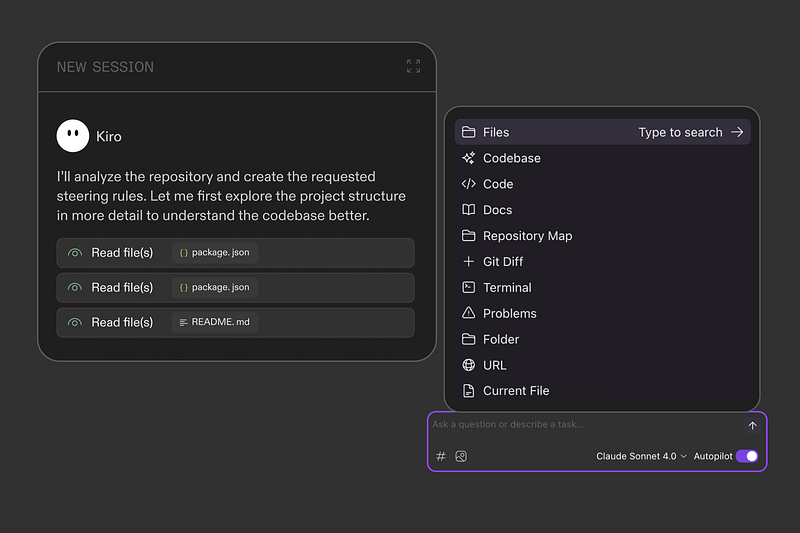
3. Persistent Project Context with Steering Files: A common limitation of AI assistants is their lack of “institutional memory.” Kiro addresses this with “steering files” — project-level markdown documents stored in your .kiro/steering/ directory. These files provide deep, tailored context for every recommendation or code change. They can include:
product.md: Product vision, target users, key features.tech.md: Technology stack, technical constraints.structure.md: File organization, naming conventions, architectural patterns.- Custom files:
api-standards.md,testing.md,security.md, etc. These steering files can be configured to be always included, loaded based on file patterns, or referenced manually, ensuring Kiro always understands your project's unique conventions and context.
4. Automated Quality Assurance with Agent Hooks: Kiro bakes in continuous quality assurance. “Agent Hooks” allow you to automate repetitive workflows and enforce best practices. You can configure Kiro to trigger actions on events like:
- File save: Automatically regenerate tests, update documentation, run linters, or perform security checks.
- Git commit: Ensure all tests pass, or documentation is updated before a commit. This means best practices are enforced automatically, significantly reducing technical debt and improving code quality (a McKinsey report from 2025 highlights that 60% of AI-generated code often lacks documentation, a pain point Kiro directly addresses).
5. Integrated, Open Ecosystem: Kiro is built on the open-source core of VS Code. This means you can continue to use your favorite VS Code themes, extensions (via Open VSX), and familiar dev workflows, making the transition remarkably smooth.
Kiro.dev in the Market: Trends, Competition, and Stats
Kiro enters a dynamic and competitive market of AI-powered development tools. Here’s how it’s positioned and what the landscape looks like:
Market Trends: The trend is clearly towards more autonomous and context-aware AI tools. Developers are moving beyond simple code suggestions and demanding assistants that can understand project-wide context, plan complex features, and even manage parts of the development lifecycle. Kiro’s spec-driven, agentic approach is directly in line with this demand, aiming to turn “vibe coding” (rapid, unstructured prototyping) into organized, production-ready software.
Competition:
- GitHub Copilot: Excellent for inline code suggestions and autocomplete.
- Cursor: Offers project-wide context awareness and strong refactoring capabilities.
- Google’s Gemini Code Assist: Provides code suggestions, test generation, and a chat interface.
- Claude Code: Another strong contender, often praised for its ability to generate high-quality code.
How Kiro Stands Out: While competitors focus on augmenting the developer, Kiro aims to act as an “autonomous project lead.” Its unique selling proposition is its rigid, standardized pipeline (Requirements -> Design -> Tasks -> Testing), ensuring every feature is systematically planned and executed with accompanying documentation and tests. This focus on structured development is particularly appealing for enterprise environments and teams aiming for long-lived, maintainable applications.
Early Statistics and Performance (as of July 2025): Early reviews and benchmarks indicate promising results for Kiro:
- 70% faster development cycles through its systematic approach.
- 95% accuracy in code generation from specifications, outperforming traditional prompt-based approaches by 15–20%.
- High code quality: Benchmarks show Kiro consistently produces code with better architectural consistency and more complete tests compared to competitors (e.g., 94/100 for Kiro vs. 87/100 for Cursor in one comparison).
- Efficiency: Kiro can generate a RESTful API with authentication in 2.3 seconds with 94% accuracy, and create a complex React form with validation in 1.8 seconds with 92% accuracy.
These statistics suggest that while Kiro might not always be the fastest for simple autocompletion, its strength lies in delivering superior long-term value through accuracy and comprehensive project understanding.
Top News and Updates (July 2025)
- Official Launch: Kiro.dev officially launched in public preview on July 14, 2025, by Amazon Web Services (AWS). This marks AWS’s significant entry into the agentic IDE space.
- Hackathon Announcement: Kiro is currently hosting the “Code with Kiro Hackathon” with $100,000 in prizes, running from July 14, 2025, to August 25, 2025. This initiative aims to encourage developers to explore Kiro’s capabilities and build innovative applications.
- Model Integration: Kiro currently supports Anthropic’s Claude Sonnet 4 and 3.7 models, with plans to integrate more AI models in the future.
- Multimodal Capabilities: Kiro’s multimodal interface is a key differentiator, allowing developers to input not just text prompts but also visual diagrams, repository structures, and other contextual data.
- MCP Integration: Kiro integrates with the Model Context Protocol (MCP), an open-source framework that securely connects AI agents to external tools, databases, and APIs. This allows Kiro to access real-time data, like up-to-date AWS documentation or private knowledge bases, without exposing sensitive information to external AI services.

Getting Started with Kiro.dev: A Practical Guide for Beginners
Ready to supercharge your development workflow with Kiro? Here’s how to get started:
- Download and Install: Visit kiro.dev and download the installer for your operating system (Windows, macOS, Linux are supported).
- Sign In: You can sign in using your GitHub, Google, AWS Builder ID, or AWS SSO account. No AWS account is strictly required to use Kiro.
- Open Your Project: Launch Kiro and open an existing project folder or create a new one.
- Access the Kiro Panel: Look for the Kiro Ghost icon in the activity bar (left sidebar). This panel is your central hub for Kiro’s AI-powered features.
- Start a Chat Session: The chat pane should be open by default. This is where you’ll interact conversationally with Kiro.
- Set Up Steering Files (Recommended): To give Kiro deep context about your project, navigate to the Kiro panel and choose “Generate Steering Docs.” Kiro can auto-generate foundational files like
product.md,tech.md, andstructure.md. You can also manually create or import your existing rules (e.g., from other agents) as markdown files in the.kiro/steering/directory. - Create Your First Spec:
- In your chat session, click the “Spec” button or the “+” button in the Kiro panel’s “Specs” section.
- Describe your desired feature in natural language (e.g., “Add a user authentication system with login, logout, and password reset functionality”).
- Kiro will guide you through the Requirements, Design, and Implementation (Tasks) phases, generating the necessary documentation.
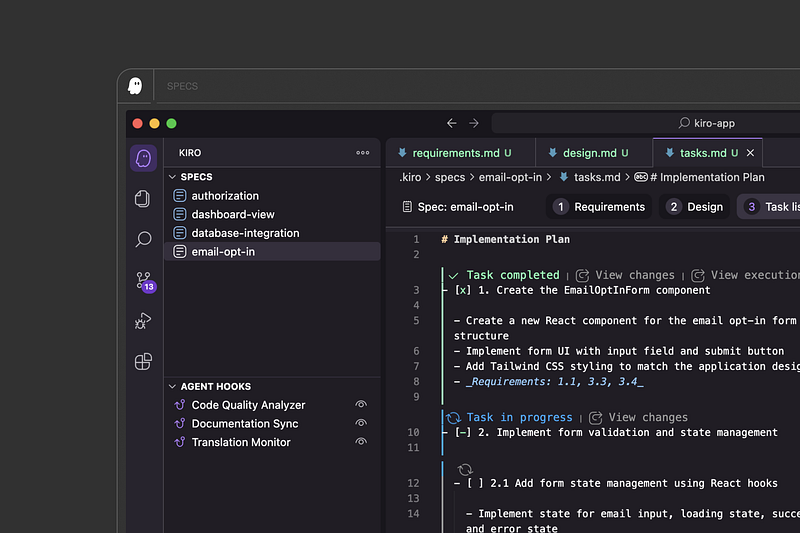
8. Execute Tasks: Once the spec is complete, review the generated tasks.md file. You can then click on individual task items to have Kiro's agents execute them, generating code and making changes across your codebase.
9. Explore Agent Hooks: In the Kiro panel, go to “Agent Hooks” and click the “+” button. Describe an automated action you want (e.g., “When I save a React component file, automatically create or update its corresponding test file”). Configure the event type and file patterns.
10. Leverage MCP (Managed Context Provider): Kiro ships with a default fetch MCP server. You can enable it or add custom MCP servers to connect Kiro to external data sources, private knowledge bases, or internal APIs for richer context.
Pricing and Availability
Kiro is currently available in public preview and is free for up to 50 agentic interactions per month. This free tier is excellent for evaluating its capabilities. For more extensive use, paid plans are coming soon:
- Kiro Pro: Approximately $19/month (1,000 interactions/month, suitable for individual developers).
- Kiro Pro+: Approximately $39/month (3,000 interactions/month, designed for teams).
It’s important to note that while Kiro covers the cost of using default AI models like Claude Sonnet, custom models via .kiro/agents.yaml or external Bedrock calls are billed separately by AWS.
Who is Kiro.dev For?
Kiro is a powerful tool for a wide range of developers and teams:
- Solo developers: Struggling with complex projects or aiming to maintain high code quality.
- Startup teams: Looking to accelerate development with fewer resources while ensuring scalability and maintainability.
- Enterprise development: Seeking to streamline workflows, enforce architectural standards, and reduce technical debt, especially in AWS environments.
- Novice developers and students: Kiro’s structured approach and clear documentation can be invaluable for learning best practices and building production-ready systems.
- Anyone tired of “vibe coding” leading to unmanageable codebases.
The Future of Development is Agentic
Kiro.dev represents a significant leap forward in AI-assisted software development. By integrating planning, coding, testing, and documentation into a single, structured, and autonomous workflow, it aims to transform how we build software. While the concept of fully autonomous AI agents in development is still evolving, Kiro provides a compelling glimpse into a future where AI isn’t just a helper, but a true co-developer, making complex projects more manageable, more maintainable, and ultimately, more successful.
Are you ready to unlock your developer superpowers with Kiro.dev? Give the preview a try and experience the future of AI-driven development.
To Read More, Follow me On medium.
Subscribe to my newsletter on LinkedIn.
Watch my content on youtube.
Connect with me on LinkedIn.
Comments
No comments yet. Be the first to comment!